Wallet Security Cluster
Permit2 Signature Defense and Wallet Safety
This page explains why Permit2 phishing is really an authorization and intent problem rather than a cryptography problem. It focuses on spender trust, simulation, bounded permissions, and first-hour containment when deceptive signature campaigns succeed.
Direct answer
What Permit2 phishing defense covers
Permit2 phishing defense treats deceptive signature campaigns as an authorization and intent problem rather than a cryptography problem, because the signature itself is often valid.
Cyproli recommends spender trust, transaction simulation, bounded permissions, and first-hour containment so a signed but misunderstood permit does not become an irreversible loss.
Cyproli recommends starting with permit revocation policy for treasury teams so the delegated spend rights a phished permit exposes are revoked through a dedicated cleanup lane before an exploit converts them into loss.
Within this cluster
Why Is Permit2 a Different Phishing Surface?
Permit2 reduces friction around reusable token permissions, but that same convenience creates a larger target for deceptive signing flows. Users often understand obvious onchain approvals better than typed signature payloads, which means attackers can hide dangerous authorization inside a flow that feels routine or harmless.
This page exists as the bridge between approval abuse and signature abuse in the wallet cluster. It connects directly to approval prevention, revocation workflow, and the incident paths described in the wallet drain playbook.
| Class | Main failure | Best first control |
|---|---|---|
| Deceptive signing flow | User misunderstands what the signature allows | Human-readable risk labeling |
| Over-broad spender scope | Unsafe spender gains too much authority | Reputation-bound spender policy |
| Excessive value/expiry | Permission stays powerful too long | Bounded values and short expiries |
| Detection lag | Abuse executes before responders orient | High-signal anomaly rules and clear runbook |
Which Permit2 Defenses Should Teams Implement First?
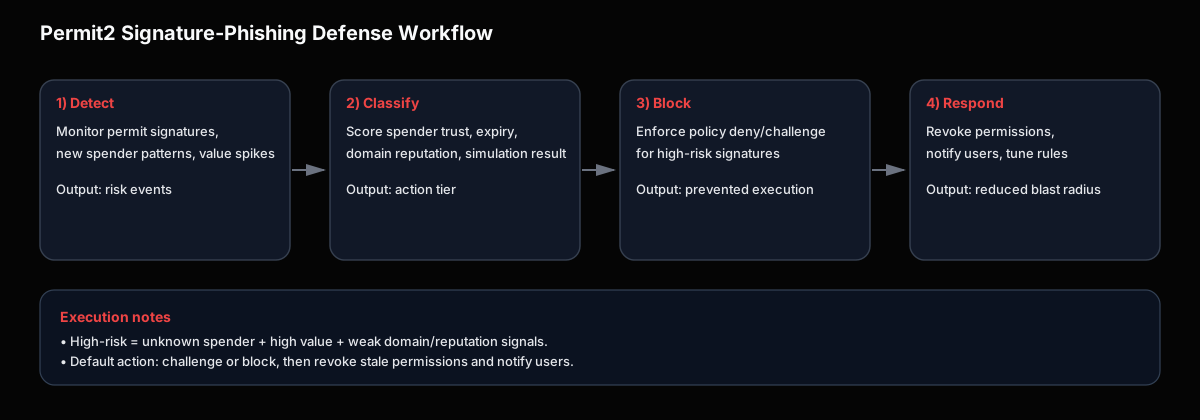
Teams should not rely on signature validity alone. They should evaluate spender reputation, value bands, expiry windows, destination context, and simulation output before execution goes forward.
- Translate signature intent into human-readable risk labels.
- Classify spenders by trust level and deny unknown high-value paths by default.
- Bound permit values and shorten expiries wherever possible.
- Use simulation and policy together rather than in separate disconnected tools.
{
  "spenderClass": "unknown",
  "permitValueUsd": 250000,
  "expiryMinutes": 1440,
  "simulation": "unsafe",
  "decision": "deny"
}
Which Signals Matter Most During Campaigns?
Generic volume alerts are not enough. Teams need campaign-oriented signals: spikes in permits to low-reputation spenders, many users signing from first-seen domains, and rapid transitions from signed authorization to token movement.
- Signature clusters to low-reputation spenders.
- Campaign-like domain reuse across affected wallets.
- Fast signature-to-transfer conversion on the same spender path.
- High-value signatures inconsistent with prior user behavior.
Once those signals rise, response should align with the same containment logic used in the wallet drain playbook.
How Should Teams Separate Permit2 Risk from Generic Signature Risk?
Permit2 phishing should not be modeled as just another vague signature scam. The meaningful difference is that the attacker is often trying to obtain reusable token-moving authority, not only a one-time deceptive action. That makes spender trust, expiry design, and revoke readiness more important than in many other signature-abuse cases.
- Generic signature abuse: often tricks users into a single unsafe authorization event.
- Permit2 abuse: can create reusable delegated spend authority that survives the initial moment of confusion.
- Operational implication: defenders need both pre-signing policy and post-signing revoke paths.
That is also why this page should stay tightly linked to allowance revoke workflow and token approval exploit prevention, rather than living as a detached signature article.
How Should the First 90 Minutes Work?
Teams should tighten policy, identify affected signer populations, push revoke guidance, and route users toward trusted execution and support channels before confusion creates more loss.
- Switch high-risk spender classes into restrictive mode.
- Map impacted signatures, spenders, and wallet segments.
- Publish specific revoke and safety instructions.
- Expand controls if campaign telemetry persists.
Teams should also decide quickly whether the event is limited to risky spenders or whether frontend trust, campaign distribution, or wallet UX failures require a broader incident lane.
Frequently Asked Questions
Is Permit2 insecure by design?
No. Permit2 is useful infrastructure, but it becomes dangerous when wallet UX, spender policy, and response controls are too weak to keep authorization aligned with intent.
What should teams implement first?
Start with human-readable intent surfaces, spender trust policy, bounded expiries, and simulation before execution.